
Cobot palletisers and pallet pattern software
Cobot palletisers.Every layer considered.
The CP series cobot palletisers from Centreline Automation stack cartons, boxes and crates at the end of your line, with no safety cage. Palletiser Studio is the software that goes with them: lay out the pallet pattern in a browser, check the cobot can reach every box, and export the recipe the robot loads.
Cobot palletisers
The CP series: a compact palletising cell you can work beside.
Each CP series palletiser is built around a TM collaborative robot. It takes cartons, boxes or crates from the end of the line and stacks them on a pallet, with a pallet position on each side of the cobot.
- Up to 8 picks a minute, with cartons up to 450 × 300 × 300 mm.
- About 3.1 × 1.6 m of floor, and the whole cell can be moved to another line.
- No safety cage, so operators are not interrupted by guarding and gates.
- Recipes on a touch screen: operators pick the product from a list.
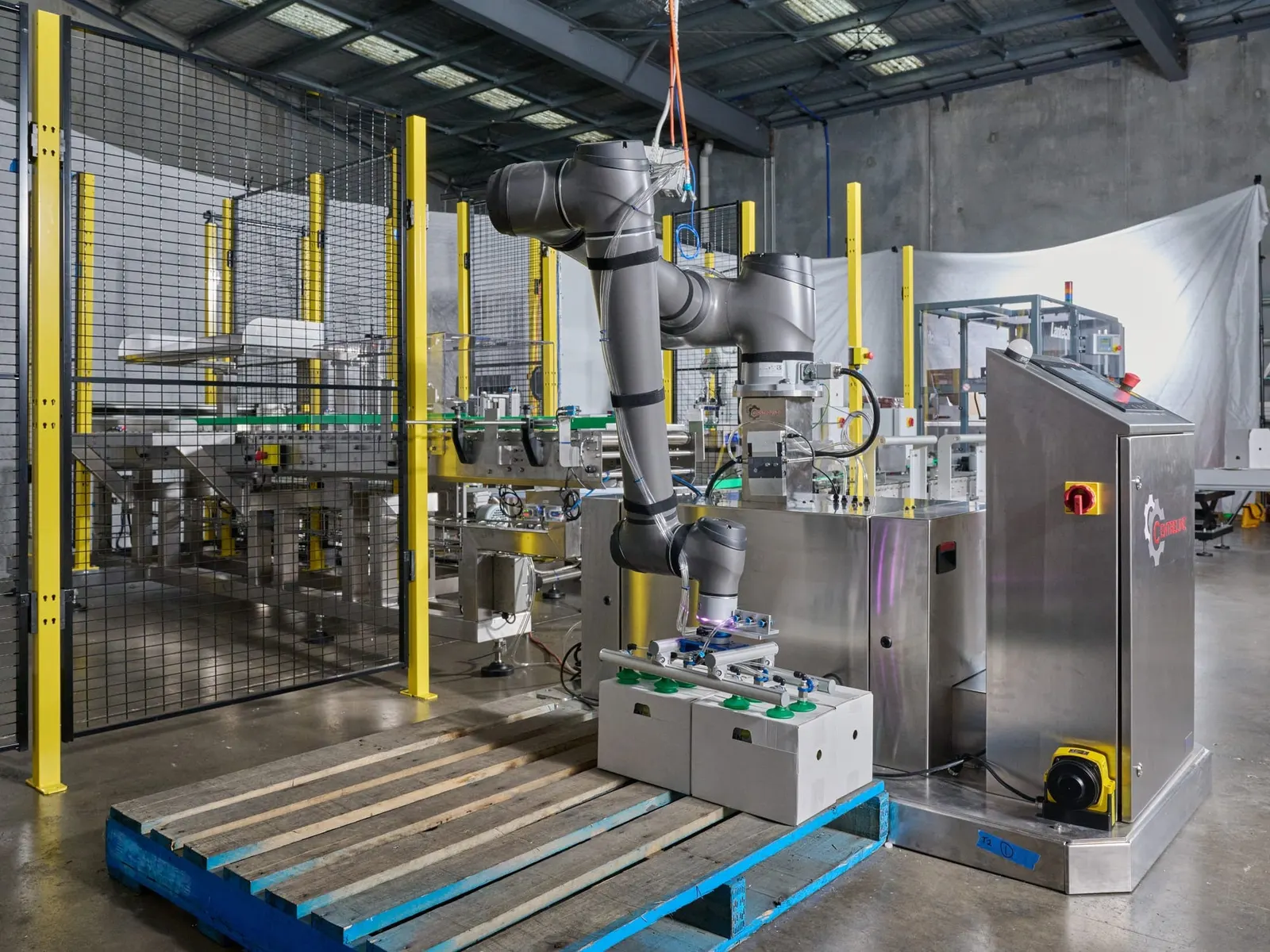
Three models, one design
The model number follows the cobot. The cell is the same in each case; the payload and reach change with the cobot fitted.
| Model | Cobot | Maximum payload | Maximum reach |
|---|---|---|---|
| CP-20 | TM20S | 20 kg | 1300 mm |
| CP-25 | TM25S | 25 kg | 1902 mm |
| CP-30 | TM30S | 30 kg | 1702 mm |
The payload includes the gripper. Centreline Automation chooses the model on the weight of your cartons and the reach your pallet pattern and stack height need. See the CP series on centreline.co.
Palletiser Studio software
The pallet pattern software that comes with every CP series palletiser.
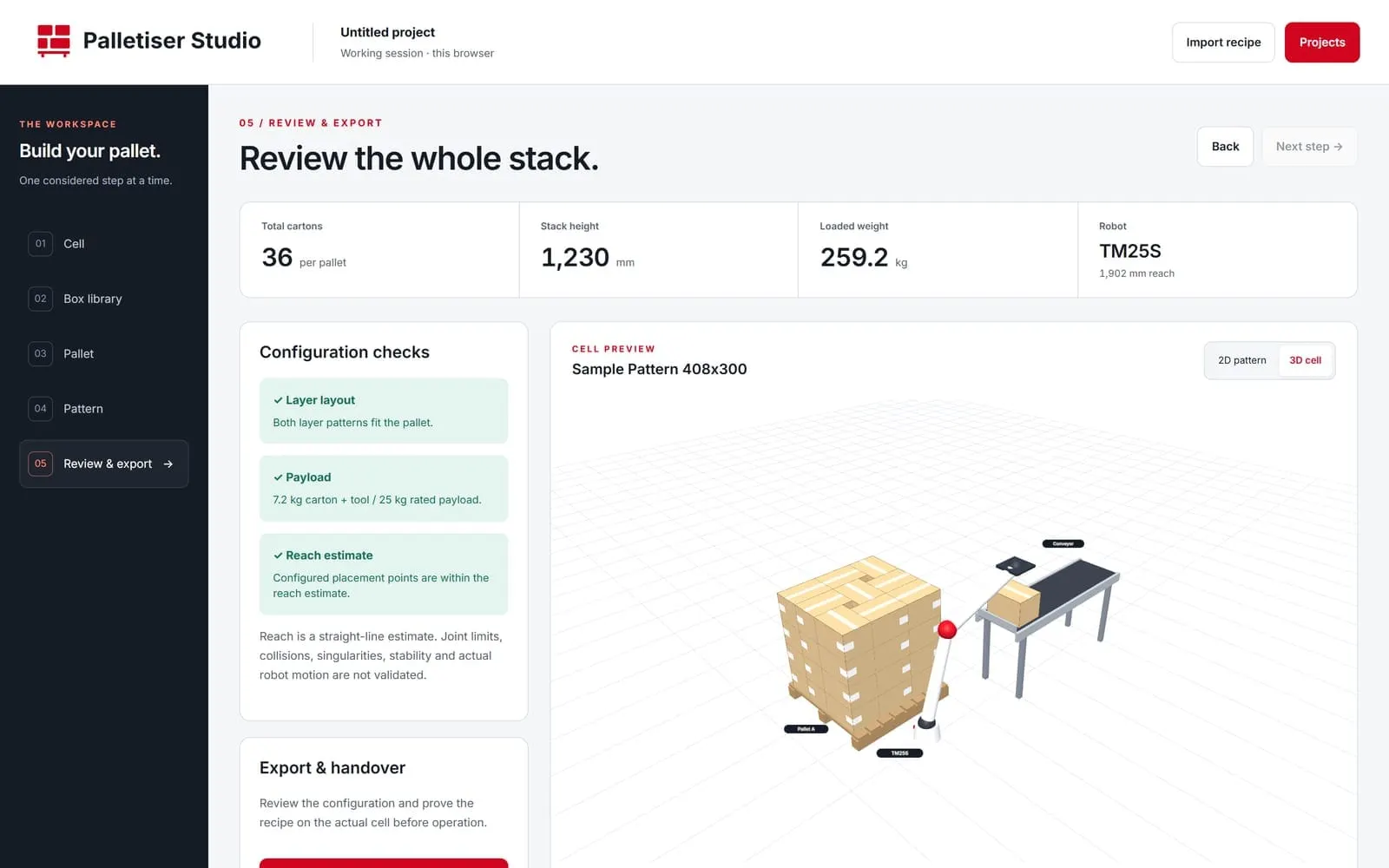
Palletiser Studio lays out a palletising cell in the browser. Set the box, the pallet and where the robot and conveyor stand, drag the cartons into a pattern, and see whether the cobot can reach every one. Then export the recipe file the robot loads and a report for the project file.
There is nothing to install and no sign-in, so your engineers can add a new carton or pattern themselves. Open it here and try it with a sample pattern.
Does the pattern fit?
Overlaps and boxes hanging over the pallet edge are flagged as you drag.
Can the robot reach it?
Every box on every layer is checked against the robot's reach, with the tool and approach height included.
What does the robot need?
The recipe file with each box position, rotation and place order, ready to import.
Who it is for
For the people who build palletising cells, and the people who run them.
Integrators and machine builders
- Check a customer's carton and pallet against the robot's reach before quoting.
- Try single-sided and double-sided layouts and see what each does to reach.
- Hand over an engineering report with the layout, the pattern and the reach figures.
- Keep every pattern for a job together in one project file.
Engineers and operators at the plant
- Add a new carton size without waiting for the supplier.
- Bring in the recipe the robot is running, adjust it, and send it back.
- Set which way the label faces on each box in the stack.
- See the finished pallet's height and weight before it is run.
What it does
From a carton size to a stack the robot can build.
Everything works in millimetres, kilograms and degrees, and the numbers on screen are the numbers in the recipe file.
Pattern editor
Drag cartons on the pallet. They snap to each other and to the pallet edges, with the gap you set between them.
Odd and even layers
Lay out two layers that alternate up the stack, or copy one to the other.
Tidy-up tools
Centre the layer, close it up to the set gaps, or spread it square to the pallet.
Reach and payload checks
Each box is measured from the robot base in 3D. Boxes out of reach, and loads over the payload, are marked.
3D cell view
See the robot, conveyor and pallets together, and play the stack being built in place order.
Place order
Set the order boxes are placed, by scan direction or by hand, separately for each side of a double-sided cell.
Label facing
Say where the label sits on the carton and see which way it faces on every box in the pattern.
Box library
Keep the cartons for a job in one list and choose one for each pattern.
Recipe file in and out
Export the TM recipe file, or import one to carry on from a pattern already in use.
Engineering report
A PDF with the cell layout, both layers, the placement table and the reach results.
Project files
Save a job with all its boxes and patterns, and export it as one file to share or back up.
How it works
Five steps, in the order you would build the cell.
Cell
Choose the robot and say where it, the conveyor and the pallets stand.
Box
Enter the carton's size and weight, and where its label is.
Pallet
Set the pallet size and how many layers to stack.
Pattern
Drag the boxes into place on each layer and set the place order.
Export
Review the checks, then download the recipe file and the report.
Robots
Built around the TM25S. Open to any arm with a known reach.
The TM25S family is built in with its published figures. For any other robot, including the TM20S and TM30S fitted to the CP-20 and CP-30, enter its reach, payload and repeatability and the same checks apply.
| Model | Version | Reach | Payload | Repeatability |
|---|---|---|---|---|
| TM25S | AC, built-in vision | 1902 mm | 25 kg | ±0.05 mm |
| TM25S-M | DC, built-in vision | 1902 mm | 25 kg | ±0.05 mm |
| TM25S-X | AC, no built-in vision | 1902 mm | 25 kg | ±0.05 mm |
| Custom robot | Your figures | Enter reach, payload and repeatability | ||
TM25S figures are from OMRON manual M104-E-03, Appendix A (September 2024). Check them against the manufacturer's current documentation for your robot.
Purchase and enquiries
Buying a cobot palletiser?
The CP-20, CP-25 and CP-30 are designed, built and supported by Centreline Automation in Melbourne. Send us your carton sizes and weights and the rate you need, and we will recommend a model and come back with a price. Or call +61 3 8759 3353.
Questions
Questions about cobot palletisers and Palletiser Studio.
What does a cobot palletiser cost?
It depends on the products, the gripper, the pallet patterns and what feeds the cell. Send Centreline Automation your carton sizes and weights and the rate you need, and we will come back with a price.
Which CP series model do I need?
It depends on the payload and reach the job needs. Most palletising suits the CP-25 or CP-30, and the CP-20 suits some lighter products. The payload of 20, 25 or 30 kg includes the gripper.
Does a cobot palletiser need a safety cage?
No. The CP series is designed to run without a safety cage, which keeps the cell compact and easy to work beside.
Is Palletiser Studio included with the palletiser?
Yes. Every CP series palletiser comes with Palletiser Studio, so new box sizes and pallet patterns can be designed later and selected as recipes on the cell's touch screen.
Do I need an account to use Palletiser Studio?
No. Open the designer and start. There is nothing to install and no sign-in.
Where are my projects kept?
In your browser's own storage on the computer you are using. They stay there between visits, but they do not follow you to another computer or browser. To move or back up a job, export it as a project file and import it where you need it.
Which robots does it work with?
The TM25S, TM25S-M and TM25S-X are built in. For any other robot, choose Custom robot and enter its reach, payload and repeatability. The recipe file is in the format the TM palletising software reads.
What is in the recipe file?
A small CSV file. The first line holds the box size and weight, the number of boxes on each layer, the pallet size and the number of layers. Each line after that is one box: its position, its rotation, and its place order for each side of the cell.
What does the reach check cover?
It measures the straight-line distance from the robot base to each box, including the tool and the approach height above it, and compares that with the robot's reach. It does not check joint limits, the path between points, or collisions, so a pattern that passes still needs proving on the robot.
Can I design a double-sided cell?
Yes. Switch the cell to double-sided, place the second pallet, and both pallets are checked for reach. Each side has its own place order.
Start with one carton. See the whole pallet.
The designer opens with a sample pattern you can change straight away.